Using ORA with Excel
After you use the Clipboard or Memory features of the OraPanel, you can use CTL-V to paste data into Excel or any other spreadsheet program.
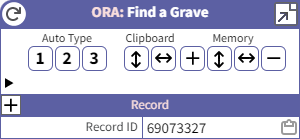
Using the Clipboard controls, you may copy the current record's fields to the clipboard.
Using the Memory controls, you may copy the fields from multiple records and then paste them with one paste command. ORA uses the Field labels to align data in rows and columns.
Example
- Use the Memory [+] button multiple times, once for each of a set of records you want to compare.
- Use the button in the Memory section to copy the records to the Windows clipboard.
- Switch to Excel, click on an empty cell, then use CTL-V to paste the records into the spreadsheet.
Here's an example result where I used the [+] button once for each of three US Federal Census records, 1880, 1900, and 1910:
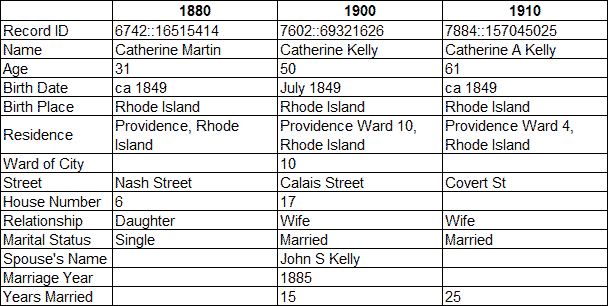
For the purposes of this article, I deleted several rows and performed some other cleanup.
Possible Problem
After using CTL-V to paste the records into Excel, you may not see the results you expect. Specifically, you may get values that spill into multiple columns. See the highlighted cells below:
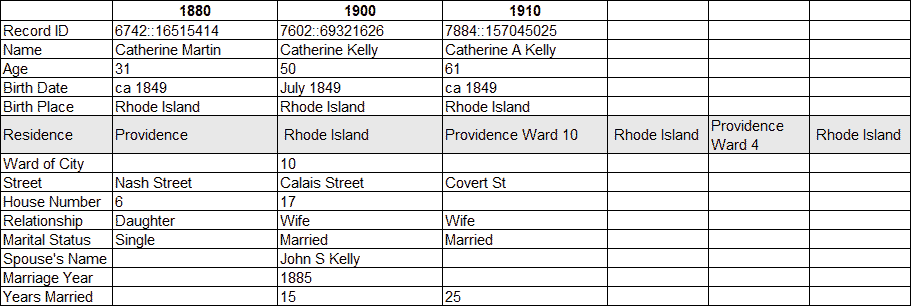
The problem is an Excel configuration issue. When pasting the cell data, Excel is treating the commas in the "Residence" Field values as delimiters. Excel remembers the settings from the last time you used its Text to Columns feature and you used a comma as a delimiter. Excel applies the Text to Columns setting for future paste operations.
- Click on any cell that has a text value.
- Go to the Data tab and select Text to Columns.
- Choose Delimited and click Next.
- Uncheck Comma.
- Check Tab.
- Leave all other checkboxes unchecked.
- Click Finish.
After performing those steps, the updated Text to Columns settings will apply to the paste operation, and CTL+V will oeprate as expected when pasting Fields copied from ORA.
If you see any alignment issue where Field values do not fall into the columns you expect, follow the procedure above to make sure the Text to Columns are configured properly for use with ORA.